




Primary SEO Metadata
- Target SEO Title: Complete IT Basics Diploma in Lahore (2026) | Computer Applications Course
- Meta Description: Master computer fundamentals, Microsoft Office, Windows administration, internet security, and office automation. Enroll in Nemcon Systems’ top IT diploma in Lahore.
- Primary Keyword: IT Basics Diploma in Lahore
- High-Intent Secondary & LSI Keyword Cluster: IT course for beginners, computer diploma in Lahore, learn IT basics, basic computer course, information technology diploma, Microsoft Office training (Word, Excel, PowerPoint), Windows operating system basics, computer hardware and software fundamentals, internet and email etiquette, typing skills, basic networking and troubleshooting, cyber safety basics, best computer institute in Lahore, Nemcon Systems IT diploma.
- Search Intent: Educational + Commercial Intent (Beginners, students, matric/intermediate graduates, and working professionals seeking practical digital literacy and office automation credentials).
+----------------------------------------------------------------------------------------------------+
|                NEMCON SYSTEMS IT BASICS & COMPUTER APPLICATIONS FRAMEWORK (2026)                   |
+------------------------------------+-----------------------------------+---------------------------+
| FOUNDATIONAL COMPUTING & HARDWARE  | OFFICE PRODUCTIVITY & AUTOMATION  | DIGITAL SAFETY & CAREERS  |
| - PC Architecture & Peripherals    | - MS Word Professional Layouts    | - Cyber Hygiene & Threat  |
| - Windows 11 OS Administration     | - MS Excel Formulas & Analytics   |   Mitigation (Phishing)   |
| - File Hierarchies & Storage Media | - MS PowerPoint Visual Pitching   | - Cloud Collaboration     |
| - Preventive Maintenance & BIOS    | - Fast Touch-Typing Competency    | - Gateway to CCNA & Web   |
+------------------------------------+-----------------------------------+---------------------------+
Complete IT Basics & Computer Applications Diploma (2026): The Ultimate Gateway to Tech Careers
In an era governed by artificial intelligence, cloud ecosystems, digital commerce, and automated business workflows, computer literacy is no longer an optional credential—it is the universal currency of the modern global economy. Whether your ambition is to manage administrative operations for an enterprise, run an e-commerce business, execute accounting audits, assist executive leadership, or launch a career in advanced technology fields such as Computer Networking (CCNA), Cybersecurity, or Full-Stack Web Development, everything begins with a rock-solid foundation.
Yet, thousands of ambitious students, school graduates, job seekers, and career changers across Pakistan experience what educational psychologists term “digital intimidation.” Modern software interfaces appear overwhelming, technical jargon sounds like an alien language, and the fear of making a costly mistake on a workplace workstation prevents talented individuals from realizing their true earning potential.
The IT Basics & Computer Applications Diploma offered by Nemcon Systems in Lahore is purposefully engineered to eliminate that anxiety forever. Designed from the ground up to reflect 2026 enterprise workplace standards, this comprehensive program transforms absolute beginners into confident, tech-savvy professionals capable of commanding modern operating systems, producing executive-grade documents, analyzing business data through complex spreadsheets, executing professional client communications, and diagnosing everyday hardware and network glitches.
In this definitive A-to-Z roadmap, we explore the complete curriculum, workplace competencies, hardware diagnostics, cloud productivity tools, and career pathways unlocked by the best computer diploma in Lahore.
1. Introduction: Why Foundational IT Literacy is Essential in 2026
The contemporary workplace has permanently retired manual typewriters, physical paper ledgers, and fragmented filing cabinets. Today, every industry—from banking, healthcare, and education to manufacturing, logistics, and legal practice—runs on digital infrastructure.
       TRADITIONAL MANUAL OFFICE (Pre-Digital)
  [Paper Ledger] ---> [Manual Filing] ---> [Physical Mail] ---> [Slow Response]
                                |
                                v (Modern Paradigm Shift)
       DIGITAL WORKPLACE ECOSYSTEM (2026 Standard)
  [Cloud Storage] <---> [MS Office 365] <---> [Local Area Network] <---> [Enterprise Security]
                                |
                                v
               PRODUCTIVITY & CAREER VALUE MULTIPLIER
1.1 The Vital Role of IT in Everyday Commercial Operations
Every administrative role, management position, and customer-facing job requires immediate proficiency with digital tools. Employers no longer provide months of on-the-job training for basic computer tasks; they expect newly hired staff to hit the ground running on day one:
- Digital Communication: Drafting formal emails that adhere to corporate security protocols and global business etiquette.
- Data Organization: Constructing dynamic spreadsheets to track sales pipelines, calculate monthly payroll, and inventory stock balances.
- Document Architecture: Formatting legal contracts, procurement quotations, and corporate proposals that represent the brand with typographic elegance.
- Cloud Collaboration: Co-authoring documents in real time across distributed teams using Microsoft OneDrive and Google Workspace.
Without verifiable computer skills, job applicants find themselves systematically filtered out by automated HR resume screeners and interview selection boards. Enrolling in an accredited IT course for beginners ensures your resume stands out with practical, demonstrable competence.
1.2 Overcoming Digital Hesitation: Anyone Can Master IT Basics
A prevalent misconception across Pakistan is that information technology is reserved solely for computer science graduates or mathematically gifted individuals. This is entirely false. Computing at the foundational level is an applied skill—much like learning to drive a vehicle. Once you understand the function of the steering wheel (the operating system), the pedals (input devices like the keyboard and mouse), and the dashboard (display interfaces and control panels), operating the vehicle becomes second nature.
At Nemcon Systems, our technical instructors specialize in pedagogical scaffolding. We break down abstract technical concepts into intuitive, real-life analogies:
- A Hard Disk Drive (HDD) or Solid-State Drive (SSD) is simply an infinitely expandable digital filing cabinet where documents reside permanently.
- Random Access Memory (RAM) is your active physical desk surface—the larger the desk, the more folders and books you can keep open simultaneously without creating clutter.
- The Central Processing Unit (CPU) is the diligent office worker seated at the desk, reading instructions and executing tasks at billions of cycles per second.
Through structured hands-on lab sessions, students who have never touched a computer mouse quickly overcome hesitation, build muscle memory through touch typing, and gain unshakeable confidence in front of modern computer workstations.
1.3 The Strategic Bridge to High-Income Tech Specializations
An information technology diploma is not merely an entry ticket to office administration; it serves as the essential bedrock for every high-income technical career:
| Advanced Tech Specialization | Prerequisite Foundational IT Skill Mastered in This Diploma |
|---|---|
| Cisco CCNA Networking | IP addressing basics, Ethernet cabling, NIC card configuration, and LAN topology fundamentals. |
| Cybersecurity & Ethical Hacking | Windows user permissions, file extensions, password entropy, anti-malware operation, and phishing analysis. |
| Full-Stack Web Development | File directory trees, browser developer environments, text manipulation, and cloud asset hosting. |
| Modern Cloud Administration (MCSE / Azure) | Windows 11 settings, administrative control panels, storage partitioning, and virtualization concepts. |
By mastering computer fundamentals first, you eliminate the steep learning curve that causes unprepared students to struggle when attempting advanced certifications.
2. Core Curriculum Breakdown: What Does an IT Basics Diploma Cover?
The curriculum of the Nemcon Systems IT Basics Diploma in Lahore is rigorously aligned with international vocational standards (such as CompTIA IT Fundamentals ITF+ and Microsoft Office Specialist standards). Below is the comprehensive structural overview of what students master over the course of the program:
+----------------------------------------------------------------------------------------------------+
|                     COMPLETE IT BASICS CURRICULUM ARCHITECTURE (5 MODULES)                         |
+----------------------------------------------------------------------------------------------------+
|  MODULE 1: Computer Hardware & Peripherals Architecture (Motherboards, Ports, RAM, Storage)       |
|  MODULE 2: Windows 11 Operating System Administration, File Trees & Security Controls              |
|  MODULE 3: Enterprise Office Automation (Microsoft Word, Excel, PowerPoint & Typing Mastery)       |
|  MODULE 4: Networking Fundamentals, Internet Protocols, Email Etiquette & Cloud Ecosystems         |
|  MODULE 5: Digital Safety, Antivirus Management, System Maintenance & Hardware Diagnostics         |
+----------------------------------------------------------------------------------------------------+
Complete Syllabus Matrix
| Module Number & Title | Core Technical Competencies | Practical Lab Exercises | Real-World Workplace Output |
|---|---|---|---|
| Module 1: Hardware & Architecture | CPU, RAM, SSD vs. HDD, Motherboard bus, Power Supply Units (PSU), GPU, I/O ports (USB-C, HDMI, DisplayPort). | Disassembling and inspecting desktop chassis; installing RAM; connecting dual-monitor setups. | Ability to evaluate PC purchasing specs, upgrade workplace hardware, and cable office workstations. |
| Module 2: Windows 11 Operating System | File systems (NTFS, FAT32), Task Manager, Control Panel, Device Manager, Disk Management, User Accounts. | Creating partitioned drives; configuring user privileges; managing background startup processes. | Confident Windows workstation administration, system backup creation, and OS troubleshooting. |
| Module 3: MS Word Mastery | Typographic hierarchy, styles, multi-column layouts, table formatting, mail merge, headers/footers. | Drafting a 10-page formal business report with automated Table of Contents and citations. | Production of publication-ready contracts, proposals, office memorandums, and corporate tenders. |
| Module 4: MS Excel for Business | Grid architecture, cell references (Relative vs. Absolute), arithmetic formulas, logical IF, VLOOKUP/XLOOKUP, Pivot Tables. | Building an automated Monthly Profit & Loss Statement and an Employee Payroll Attendance Sheet. | Professional bookkeeping, inventory audits, sales reporting, and business intelligence charts. |
| Module 5: MS PowerPoint Pitching | Master slide design, visual pacing, typographic contrast, smart animations, embedded multimedia, presenter mode. | Designing an executive 12-slide commercial investor pitch deck with interactive callouts. | Delivering high-impact corporate presentations, academic defenses, and product launches. |
| Module 6: Typing & Speed Mastery | QWERTY keyboard layout, home-row finger placement, ergonomic posture, touch-typing techniques. | Daily timed speed drills targeting 35 to 50 Words Per Minute (WPM) with 98%+ accuracy. | High-speed data entry, zero-error typing, and enhanced daily office throughput. |
| Module 7: Internet, Email & Cloud | Search operators (Boolean logic), POP3 vs. IMAP, corporate email structure, OneDrive/Google Drive syncing. | Configuring business email signatures; scheduling calendar meetings; managing shared team folders. | Professional corporate correspondence and frictionless remote work collaboration. |
| Module 8: Networking & Troubleshooting | LAN, Wi-Fi 6, IPv4 addressing, Default Gateway, DNS, Command Prompt (ping, ipconfig), router consoles. | Terminating an RJ-45 Ethernet cable; setting up a Wi-Fi router; fixing “No Internet Access” faults. | Troubleshooting office connectivity issues without waiting for external network technicians. |
| Module 9: Cyber Hygiene & Safety | Social engineering, phishing scams, ransomware mechanics, password managers, 2FA/MFA, browser caching. | Spotting deceptive spoofed emails; implementing two-factor authentication on commercial accounts. | Protecting company workstations and client data against digital theft and malware infection. |
Visual Curriculum & Learning Progression Architecture
To provide an intuitive visual representation of how each skill builds upon the previous one, Figure 1.0 illustrates the structured learning roadmap from initial hardware assembly to certified workplace readiness:
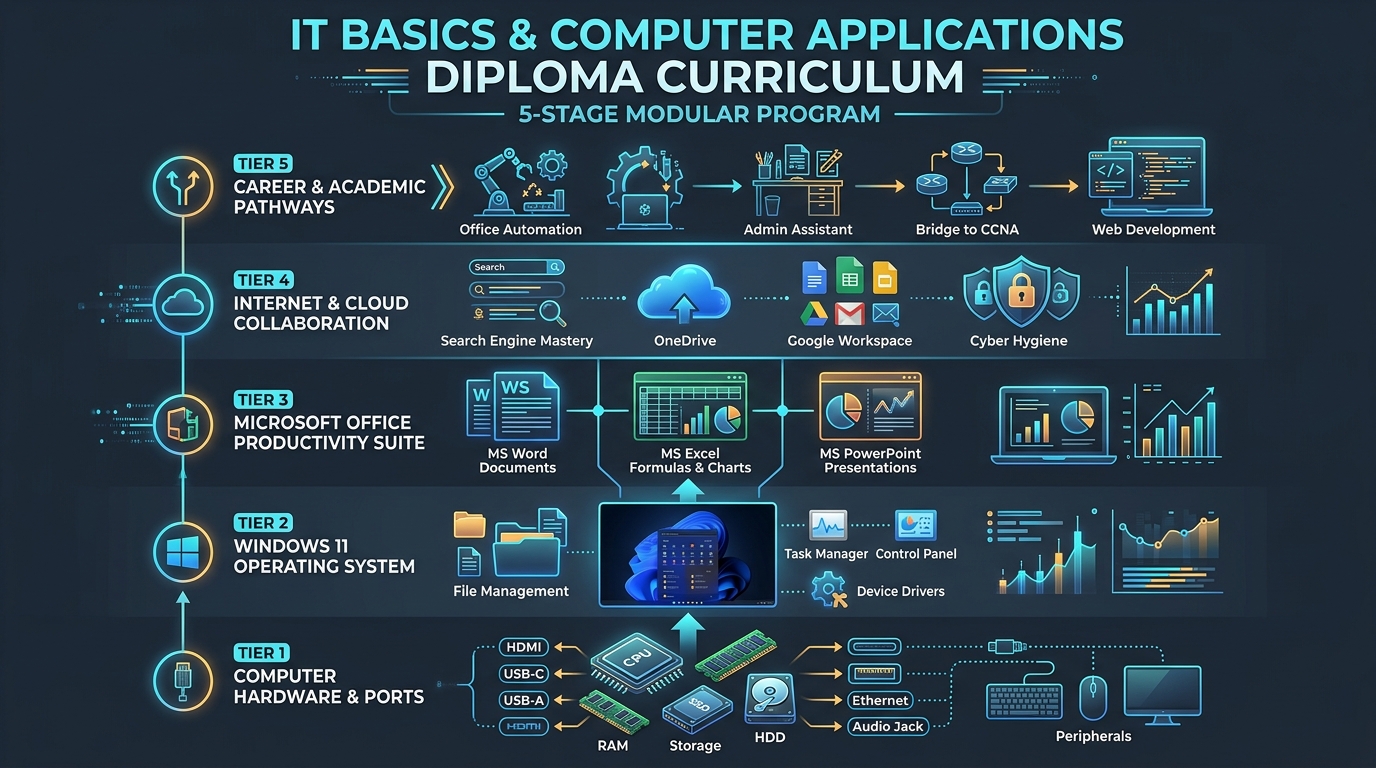 Figure 1.0: Five-Stage Learning Progression Architecture of the Nemcon Systems IT Basics & Computer Applications Diploma in Lahore.
3. Microsoft Office Mastery for the Modern Workplace
While hundreds of software applications exist today, the Microsoft Office Suite remains the indisputable backbone of corporate enterprise productivity worldwide. More than 85% of Fortune 500 companies and thousands of commercial firms across Pakistan rely daily on Microsoft Word, Excel, and PowerPoint. Mastering these tools at an advanced, practical level is the centerpiece of the computer diploma in Lahore at Nemcon Systems.
+----------------------------------------------------------------------------------------------------+
|                         MICROSOFT OFFICE 365 ENTERPRISE PRODUCTIVITY SUITE                         |
+-----------------------------------+-----------------------------------+----------------------------+
|        MICROSOFT WORD             |         MICROSOFT EXCEL           |    MICROSOFT POWERPOINT    |
| - Formal Corporate Contracts      | - Financial Modeling & Budgets    | - Strategic Investor Decks |
| - Automated Table of Contents     | - Formulas: VLOOKUP, IF, SUMIFS   | - Dynamic Master Slide Art |
| - Batch Mail Merge Automations    | - Pivot Tables & Data Analysis    | - Executive Infographics   |
| - Standardized Typography Themes  | - Data Validation & Conditional   | - Smooth Morph Transitions |
+-----------------------------------+-----------------------------------+----------------------------+
3.1 Microsoft Word: Professional Documentation, Formatting & Automation
Most casual computer users believe MS Word is simply an electronic typewriter. In a high-stakes corporate environment, this superficial knowledge leads to disorganized, amateurish documents with misaligned tables, broken fonts, and messy page breaks.
In our Microsoft Office training (Word, Excel, PowerPoint), students learn to treat Microsoft Word as an automated desktop publishing engine:
- Document Hierarchy & Styles: Implementing heading styles (
Heading 1,Heading 2,Normal Text) to enable one-click automated Tables of Contents, dynamic navigation panes, and consistent institutional branding across hundreds of pages. - Advanced Tabular Layouts: Designing financial balance sheets, quotation tables, and project timelines with customized borders, cell padding, column alignment, and formula calculations directly inside Word.
- Sections & Page Breaks: Mastering the critical distinction between soft page breaks and Section Breaks (Next Page / Continuous) to allow landscape spreadsheet pages inside a portrait-oriented legal document, alongside independent header/footer numbering.
- Mail Merge Automation: Connecting an Excel client database to a Word document to generate thousands of personalized appointment letters, student certificates, or invoice receipts in seconds with zero manual typing.
- Keyboard Shortcuts Mastery: Eliminating reliance on the mouse by memorizing essential productivity combinations:
Ctrl + Shift + C/Ctrl + Shift + V(Format Painter Copy/Paste)Ctrl + K(Instant Hyperlink Insertion)Ctrl + Alt + 1/Ctrl + Alt + 2(Instant Heading Style Application)Alt + Shift + D(Dynamic Current Date Insertion)
3.2 Microsoft Excel for Business: Spreadsheets, Formulas & Data Analytics
Microsoft Excel is the single most valuable business application on earth. Proficiency in Excel instantly separates entry-level applicants from high-earning administrative professionals.
+----------------------------------------------------------------------------------------------------+
|                            SAMPLE WORKPLACE EXCEL FORMULA ARCHITECTURE                             |
+----------------------------------------------------------------------------------------------------+
| 1. Dynamic Salary Calculation:                                                                     |
|    =IF(D2 >= 40, (D2 * E2) + ((D2 - 40) * (E2 * 1.5)), D2 * E2)                                  |
|                                                                                                    |
| 2. Automated Product Lookup:                                                                       |
|    =VLOOKUP(B5, Inventory_Table!$A$2:$G$500, 3, FALSE)                                            |
|                                                                                                    |
| 3. Multi-Condition Sales Aggregation:                                                              |
|    =SUMIFS(Sales_Amount, Region_Range, "Lahore", Agent_Range, "Ali", Month_Range, "October")       |
+----------------------------------------------------------------------------------------------------+
At Nemcon Systems, we bypass theoretical lectures and place students directly in front of commercial business datasets:
- The Arithmetic & Statistical Core: Mastering foundational calculations including
=SUM(),=AVERAGE(),=MIN(),=MAX(), and=COUNT(). - Logical Operations for Automated Decision-Making: Utilizing the power of
=IF(), nestedIFstatements,=AND(), and=OR()to automatically calculate employee performance bonuses, student grading scales, and tax brackets. - Lookup & Reference Functions: Harnessing
=VLOOKUP(),=HLOOKUP(), and the modern, flexible=XLOOKUP()function to search across massive catalogs containing tens of thousands of product SKUs and retrieve instant customer pricing. - Conditional Formatting & Visual Cues: Designing heatmaps and automated color alerts that instantly flag overdue invoices in red, profitable margins in green, and low inventory balances in amber.
- Data Cleansing & Manipulation: Splitting customer names using Text to Columns, eliminating duplicate records, utilizing Flash Fill, and locking cell references using absolute addressing (
$A$1). - Pivot Tables & Interactive Dashboards: Transforming chaotic raw transaction logs into summarized executive dashboards featuring interactive slicers, percentage variance comparisons, and automated revenue charts.
3.3 Microsoft PowerPoint: Designing High-Impact Visual Presentations
A poorly designed presentation puts audiences to sleep, while a crisp, modern presentation wins lucrative contracts and impresses corporate leadership.
Our diploma trains students to build world-class presentations using proven visual communication principles:
- The 6x6 Rule: Avoiding text clutter by limiting slides to a maximum of six bullet points, with each point containing no more than six words.
- Slide Master Architecture: Creating customized corporate slide master templates featuring organizational logos, consistent color palettes, and standardized font pairings so that every new slide automatically complies with brand guidelines.
- SmartArt & Data Visualization: Converting tedious bullet-point lists into dynamic process flows, organizational hierarchies, and cyclical diagrams.
- Morph Transitions & Subtle Micro-Animations: Implementing smooth modern transitions (such as Microsoft’s revolutionary Morph tool) to pan smoothly between architectural schematics and data points without distracting the audience.
- Presenter Mode & Audience Engagement: Leveraging dual-monitor presenter tools to view private speaking notes, track elapsed timing, and utilize digital laser pointers during boardroom presentations.
4. Hardware Basics, System Maintenance & Troubleshooting
A certified IT professional must never be helpless when a physical cable disconnects, a monitor flickers, or a computer fails to boot. The Nemcon Systems IT Basics Diploma in Lahore equips students with hands-on mechanical and diagnostic capabilities.
+----------------------------------------------------------------------------------------------------+
|                      SYSTEM HARDWARE TROUBLESHOOTING DECISION TREE                                 |
+----------------------------------------------------------------------------------------------------+
|                                  [POWER BUTTON PRESSED]                                            |
|                                            |                                                       |
|                     +----------------------+----------------------+                                |
|                     |                                             |                                |
|             [No Lights / No Fan]                           [Fans Spin / No Display]               |
|                     |                                             |                                |
|           - Check Power Cable & Fuse                    - Reseat RAM Sticks (Clean Gold Pins)      |
|           - Test Power Supply (PSU)                     - Verify Display Cable (HDMI/DP)           |
|           - Check Motherboard 24-Pin                    - Check Monitor Input Channel Selector     |
+----------------------------------------------------------------------------------------------------+
4.1 Understanding Motherboards, Ports, Cables & Peripherals
Students physically examine open desktop computer cases in our dedicated hardware labs, identifying:
- Storage Technologies: The tangible operational differences between mechanical Hard Disk Drives (HDD - 5400/7200 RPM), SATA Solid-State Drives (SSD - 550 MB/s), and ultra-fast NVMe M.2 SSDs (operating at 3,500+ to 7,000 MB/s read/write speeds).
- Display Interfaces: Comparing analog legacy VGA connectors against modern digital standards like HDMI 2.1 and DisplayPort 1.4, understanding refresh rates (60Hz vs. 144Hz), audio pass-through, and multi-monitor daisy chaining.
- Universal Serial Bus (USB) Evolution: Differentiating USB 2.0 (Black port, 480 Mbps) from USB 3.0/3.2 (Blue port, 5–10 Gbps) and high-speed USB Type-C / Thunderbolt connectors capable of video output, 100W power delivery, and ultra-fast data transfers.
- Peripheral Hardware Setup: Correctly installing and calibrating network laser printers, document flatbed scanners, barcode readers, webcam arrays, and biometric attendance clocks.
4.2 Practical PC Troubleshooting: Diagnosing Slow Performance & Faults
When an office workstation grinds to a halt, students utilize systematic diagnostic methodologies rather than panic:
- Task Manager Analysis: Launching
Ctrl + Shift + Escto analyze real-time resource utilization across the CPU, Memory, Disk, and Network tabs. Pinpointing runaway rogue processes and disabling unneeded background applications in the Startup Apps tab. - Disk Cleanup & Cache Eviction: Removing gigabytes of accumulated temporary files by navigating to Windows Storage Sense, executing
cleanmgr.exe, and emptyingC:\Windows\Tempand%temp%. - Driver Updates & Hardware Verification: Launching
devmgmt.msc(Device Manager) to detect yellow exclamation warnings indicating missing or corrupted graphics, audio, or network interface card (NIC) drivers. - RAM Diagnostics: Utilizing the built-in Windows Memory Diagnostic tool (
mdsched.exe) to detect faulty memory blocks that trigger Blue Screen of Death (BSOD) system crashes.
4.3 Safe Operating System Installation & Backup Practices
Students learn how to create official bootable USB flash drives utilizing Microsoft’s Media Creation Tool and Rufus, partition solid-state storage into separate Operating System (C:) and Personal Data (D:) volumes, and configure automated system restore points alongside external cloud image backups.
5. Internet, Cloud Tools & Remote Work Essentials
In the modern enterprise landscape, work is no longer confined to a single physical office desk. Remote work, hybrid teams, and multinational collaborations require mastery over web research, cloud platforms, and virtual communications.
       LOCAL WORKSTATION                         CLOUD COLLABORATION LAYER
+-------------------------------+             +-------------------------------+
|  Windows 11 Workstation       |             |  Microsoft OneDrive / 365     |
|  - Local Document Edits       | <---------> |  - Automated Cloud Sync       |
|  - High-Speed Touch Typing    |             |  - Version History Recovery   |
+-------------------------------+             +-------------------------------+
               |                                             ^
               v                                             |
+-------------------------------+             +-------------------------------+
|  Web Research & Security      |             |  Google Workspace Ecosystem   |
|  - Advanced Boolean Search    | <---------> |  - Shared Google Drive Folders|
|  - Encrypted HTTPS Browsing   |             |  - Real-Time Team Editing     |
+-------------------------------+             +-------------------------------+
5.1 Advanced Web Research & Information Verification
The internet contains billions of gigabytes of information, but the majority of casual searchers waste hours sifting through irrelevant search results. Our instructors train students in professional Boolean search syntax:
"exact phrase matching": Placing quotes around technical phrases to eliminate fragmented results.site:gov.pkorsite:edu: Restricting search queries to verified government or academic domains.filetype:pdforfiletype:xlsx: Instantly locating published whitepapers, financial templates, and official government gazettes.-excluded_term: Filtering out sponsored commercial noise and irrelevant product listings.
5.2 Cloud Storage Collaboration (Google Drive & Microsoft OneDrive)
Losing critical office documents due to a sudden hardware crash or accidental deletion can ruin a business. Students master modern cloud synchronization:
- Folder Permissions & Security Hierarchies: Managing granular access control levels—understanding when to grant
Viewer,Commenter, orEditorprivileges on shared corporate folders to prevent unauthorized tampering. - Real-Time Co-Authoring: Collaborating inside the same live document alongside colleagues, tracking changes, resolving inline comments, and restoring older snapshots using Version History.
- Local Drive Integration: Configuring the desktop OneDrive and Google Drive synchronization clients to automatically back up Desktop, Documents, and Pictures folders without manual intervention.
5.3 Virtual Meeting Tools Setup (Zoom, Microsoft Teams, Google Meet)
Professional video conferencing requires more than just opening an application. Students are trained in executive digital meeting standards:
- Configuring hardware audio inputs, noise-canceling microphone filters, and HD video camera framerates.
- Managing screen sharing protocols (sharing a single focused application window versus an entire desktop display to maintain confidentiality).
- Utilizing digital whiteboards, breakout rooms, and calendar invites integrated directly with Microsoft Outlook and Google Calendar.
6. Career Scope & Progression After an IT Basics Diploma
Completing an IT Basics Diploma in Lahore is one of the fastest, most cost-effective methods to achieve financial independence and enter the professional job market. Because computer proficiency is needed across every commercial sector, graduates enjoy diverse employment opportunities.
                                  [IT BASICS DIPLOMA]
                                           |
             +-----------------------------+-----------------------------+
             |                                                           |
             v                                                           v
   [IMMEDIATE EMPLOYMENT]                                      [ADVANCED TECH BRIDGE]
   - Computer Operator                                         - CCNA Network Engineer
   - Office Administrative Assistant                           - Ethical Hacker / SOC Analyst
   - Data Entry Specialist                                     - Full-Stack Web Developer
   - Customer Support Coordinator                              - Cloud Infrastructure Admin
6.1 Immediate Entry-Level Career Opportunities
-
Computer Operator / Data Entry Specialist:
- Role: Entering financial records, patient records, inventory logs, and customer profiles into enterprise databases with high speed and zero typographical errors.
- Target Industries: Private hospitals, logistics firms (TCS, Leopards, DHL), retail chains, government agencies, and educational institutions.
- Average Starting Salary (Lahore/Pakistan): PKR 35,000 to PKR 55,000 / month.
-
Office Administrative Assistant / Executive Secretary:
- Role: Managing executive email correspondence, preparing boardroom presentation decks in PowerPoint, drafting formal memorandums in Word, and scheduling meetings.
- Target Industries: Law firms, corporate headquarters, real estate agencies, and manufacturing conglomerates.
- Average Starting Salary (Lahore/Pakistan): PKR 45,000 to PKR 70,000 / month.
-
Front-Desk Billing & Accounts Assistant:
- Role: Managing Point-of-Sale (POS) software, generating customer invoices, reconciling daily cash registers using Excel spreadsheets, and handling client queries.
- Target Industries: Supermarkets, pharmaceutical distributors, hotels, and automobile dealerships.
- Average Starting Salary (Lahore/Pakistan): PKR 40,000 to PKR 60,000 / month.
-
School / College Computer Lab Assistant:
- Role: Maintaining student workstations, configuring classroom Wi-Fi connectivity, installing educational software, and assisting teachers with digital teaching tools.
- Target Industries: Private school chains, degree colleges, and vocational training centers across Punjab.
- Average Starting Salary (Lahore/Pakistan): PKR 35,000 to PKR 50,000 / month.
6.2 Freelance & Remote Work Opportunities
For female students, college attendees, and stay-at-home individuals, an IT diploma provides the foundation to earn foreign income via global freelance platforms like Upwork, Fiverr, and Freelancer.com:
- Virtual Assistance: Providing remote administrative support to businesses in the US, UK, and UAE—handling calendar bookings, file organization, and data entry ($5 to $15/hour).
- Excel Data Cleaning & Formatting: Assisting international e-commerce sellers with cleaning messy CSV inventory files and generating automated sales reports.
- Document Formatting & Conversion: Converting messy PDF documents into cleanly formatted, editable Microsoft Word templates and fillable PDF forms.
6.3 The Stepping Stone to Elite Technical Careers
Unlike standalone certifications that focus narrowly on one software application, the Nemcon Systems diploma acts as a progressive launchpad into high-income engineering tracks:
- Networking Pathway: Progression into Cisco CCNA 200-301 certification, transitioning into Network Support Engineer and Systems Administrator roles earning PKR 90,000 to PKR 250,000+.
- Cybersecurity Pathway: Progression into Certified Ethical Hacker (CEH) and Junior SOC Analyst positions protecting corporate networks against digital espionage.
- Software Development Pathway: Progression into Full-Stack Web Development (HTML5, CSS3, JavaScript, WordPress, Python) building responsive web platforms.
7. Why Choose Nemcon Systems for Your IT Basics Diploma in Lahore
When seeking the best computer institute in Lahore, students face a landscape crowded with generic academies that rely on obsolete CRT monitors, outdated Windows 7 operating systems, and dry, theoretical chalk-and-board lectures.
Nemcon Systems represents a new standard of practical vocational education in Pakistan. Located in the accessible educational hub of Umar Block, Allama Iqbal Town, Lahore, our institute is built on a simple philosophy: You cannot learn to navigate modern technology by reading about it in a textbook—you must build muscle memory on real machines.
+----------------------------------------------------------------------------------------------------+
|                  THE NEMCON SYSTEMS PRACTICAL TRAINING ADVANTAGE (2026)                            |
+------------------------------------+-----------------------------------+---------------------------+
| 100% HANDS-ON WORKSTATION LABS     | SENIOR INDUSTRY-VETTED FACULTY    | CAREER PLACEMENT SUPPORT  |
| - Dedicated High-Performance PC    | - Over 15+ Years Enterprise IT    | - Professional CV Design  |
|   for Every Single Enrolled Student|   Field and Classroom Experience  | - Mock Job Interview Prep |
| - High-Speed Fiber Internet & UPS  | - Practical, Encouraging Pedagogy | - Official Accredited     |
|   Generator Power Redundancy       | - Step-by-Step Individual Focus   |   Graduation Certificate  |
+------------------------------------+-----------------------------------+---------------------------+
7.1 Dedicated 1-to-1 Modern PC Workstations
At Nemcon Systems, we enforce a strict one-student, one-workstation policy. You will never share a computer monitor with another student or wait for your turn to practice. Our modern computer labs feature:
- Fast Intel Core i5/i7 workstations equipped with solid-state NVMe drives and high-speed DDR4 RAM.
- Dual-monitor displays in advanced lab sections to simulate modern enterprise data management setups.
- Uninterrupted high-capacity solar and UPS generator backup, guaranteeing zero lost training minutes during city power outages.
7.2 Veteran Technical Instructors
Our instructors are not casual tutors; they are seasoned IT consultants and enterprise systems specialists with decades of combined experience in corporate network deployment, systems administration, and vocational curriculum development. They understand the exact pain points beginner students face and provide patient, step-by-step guidance.
7.3 Recognized Certification & Job Readiness Training
Upon successfully passing the practical lab assessments, graduates receive the official Nemcon Systems IT Basics & Computer Applications Diploma. In addition to technical curriculum training, our team provides comprehensive career preparation:
- Professional resume drafting emphasizing quantifiable software competencies.
- Job interview coaching and practical typing speed test preparation.
- Lifetime access to student support groups and alumni career networking channels.
8. Frequently Asked Questions (FAQ Section - Schema Optimized)
To help prospective students make an informed decision, our IT education counselors have answered the most common questions regarding the basic computer course and diploma:
Who is eligible to join the IT Basics Diploma?
There are no restrictive educational prerequisites to enroll in the IT Basics & Computer Applications Diploma at Nemcon Systems. The course is open to matriculation, intermediate, and graduate students, working professionals seeking to upgrade their computer literacy, job applicants aiming for administrative or office coordinator roles, as well as school leavers and homemakers seeking digital empowerment and freelance capabilities.
Do I need prior computer knowledge to enroll?
No, prior computer knowledge is not required. The diploma begins at ground zero. Our instructors guide you through the absolute fundamentals—from how to hold a mouse, position your fingers on the keyboard for touch-typing, and turn on the workstation, to understanding the Windows desktop interface before gradually advancing into Microsoft Office, internet safety, and networking concepts.
How long does it take to complete the IT course?
The comprehensive IT Basics & Computer Applications Diploma typically spans 2 to 3 months, depending on whether you choose weekday classes or weekend fast-track batches. Every session includes hands-on lab practice under the direct supervision of an instructor to guarantee skill retention.
What are the career benefits of obtaining this diploma from Nemcon Systems?
Graduating with an IT diploma from Nemcon Systems equips you with verified, workplace-ready competencies that qualify you for immediate employment as a Computer Operator, Office Assistant, Data Entry Specialist, Billing Executive, or Lab Coordinator across private and public sectors. Furthermore, the diploma provides the fundamental knowledge required to pursue advanced IT certifications such as Cisco CCNA, Cybersecurity, Web Development, and Cloud Administration.
9. Conclusion & Enrollment Call-to-Action
In 2026, the divide between those who thrive in the modern economy and those who struggle is defined by one fundamental factor: digital literacy. Every email sent, every report compiled, every invoice processed, and every strategic business decision made in the commercial world relies upon the foundational computing tools covered in this diploma.
You do not need an advanced engineering degree to master technology. You only need the willingness to learn, expert guidance, and access to a modern computer lab where you can practice without fear.
Whether you are looking to secure your very first office job, increase your daily productivity, re-enter the workforce, or take your first confident step toward an exciting career in networking or software development, the IT Basics & Computer Applications Diploma at Nemcon Systems is your definitive gateway to success.
Take Your First Step Into the Digital World Today!
- Campus Location: Nemcon Systems, Umar Block, Allama Iqbal Town, Lahore, Pakistan.
- Direct Enrollment Inquiry: Visit our state-of-the-art campus today to inspect our computer labs, attend a free demo orientation, and consult with our senior technical instructors.
- Online Registration: Reserve your workstation seat today by registering online at nemconsystems.com or calling our admissions office. Your journey to tech mastery begins here.
Structured Data (Schema.org JSON-LD)
<script type="application/ld+json" is:inline>
{
  "@context": "https://schema.org",
  "@graph": [
    {
      "@type": "Course",
      "name": "Complete IT Basics & Computer Applications Diploma (2026)",
      "description": "Master computer fundamentals, Microsoft Office (Word, Excel, PowerPoint), Windows administration, internet security, and office automation at Nemcon Systems in Lahore.",
      "provider": {
        "@type": "EducationalOrganization",
        "name": "Nemcon Systems",
        "url": "https://nemconsystems.com",
        "address": {
          "@type": "PostalAddress",
          "streetAddress": "Umar Block, Allama Iqbal Town",
          "addressLocality": "Lahore",
          "addressRegion": "Punjab",
          "postalCode": "54000",
          "addressCountry": "PK"
        }
      },
      "educationalCredentialAwarded": "IT Basics & Computer Applications Professional Diploma",
      "courseMode": "In-Person Classroom & Hands-On Lab",
      "hasCourseInstance": {
        "@type": "CourseInstance",
        "courseMode": "OnSite",
        "instructor": {
          "@type": "Person",
          "name": "Senior IT & Office Automation Faculty"
        }
      }
    },
    {
      "@type": "FAQPage",
      "mainEntity": [
        {
          "@type": "Question",
          "name": "Who is eligible to join the IT Basics Diploma?",
          "acceptedAnswer": {
            "@type": "Answer",
            "text": "There are no restrictive educational prerequisites to enroll in the IT Basics & Computer Applications Diploma at Nemcon Systems. The course is open to matriculation, intermediate, and graduate students, working professionals seeking to upgrade their computer literacy, job applicants aiming for administrative or office coordinator roles, as well as school leavers and homemakers seeking digital empowerment and freelance capabilities."
          }
        },
        {
          "@type": "Question",
          "name": "Do I need prior computer knowledge to enroll?",
          "acceptedAnswer": {
            "@type": "Answer",
            "text": "No, prior computer knowledge is not required. The diploma begins at ground zero. Our instructors guide you through the absolute fundamentals—from how to hold a mouse, position your fingers on the keyboard for touch-typing, and turn on the workstation, to understanding the Windows desktop interface before gradually advancing into Microsoft Office, internet safety, and networking concepts."
          }
        },
        {
          "@type": "Question",
          "name": "How long does it take to complete the IT course?",
          "acceptedAnswer": {
            "@type": "Answer",
            "text": "The comprehensive IT Basics & Computer Applications Diploma typically spans 2 to 3 months, depending on whether you choose weekday classes or weekend fast-track batches. Every session includes hands-on lab practice under the direct supervision of an instructor to guarantee skill retention."
          }
        },
        {
          "@type": "Question",
          "name": "What are the career benefits of obtaining this diploma from Nemcon Systems?",
          "acceptedAnswer": {
            "@type": "Answer",
            "text": "Graduating with an IT diploma from Nemcon Systems equips you with verified, workplace-ready competencies that qualify you for immediate employment as a Computer Operator, Office Assistant, Data Entry Specialist, Billing Executive, or Lab Coordinator across private and public sectors. Furthermore, the diploma provides the fundamental knowledge required to pursue advanced IT certifications such as Cisco CCNA, Cybersecurity, Web Development, and Cloud Administration."
          }
        }
      ]
    }
  ]
}
</script>