






Hands-On IT Engineering
PC Hardware & Windows Deployment
Active Directory & Core Networking
IP CCTV & Surveillance Systems
In today’s fast-paced enterprise environments, the modern IT Support Engineer is no longer a simple desktop technician who merely plugs in monitors or swaps keyboards. Enterprise organizations, financial institutions, educational campuses, and commercial data centers demand versatile, multi-disciplinary engineers capable of diagnosing component-level PC Hardware Assembly & Diagnostics, administering centralized Active Directory Domain Services (AD DS), designing robust LAN / WAN Architecture, and deploying mission-critical IP Camera CCTV Surveillance Systems over PoE switching fabrics.
Comprehensive Curriculum Blueprint
End-to-End Enterprise OperationsThe Complete IT Support & Physical Infrastructure Roadmap
This definitive technical guide breaks down the essential hands-on syllabus required to build, secure, maintain, and troubleshoot enterprise systems from bare-metal silicon to corporate network domains and high-definition video surveillance.
Motherboard architectures, PCIe NVMe storage, UEFI Secure Boot, GPT partitioning, clean OS image deployment, and disaster recovery.
IPv4/IPv6 subnetting, CIDR, Windows Server 2022/2025 domain controllers, GPO enforcement, DHCP scope management, and DNS.
Network Video Recorders (NVR), Managed PoE+ switching, RTSP stream optimization, remote P2P cloud monitoring, and storage math.
Module 1: Computer Hardware Engineering & Modern OS Deployment
Every reliable enterprise software stack rests upon stable physical silicon. A professional systems specialist must understand the thermal, electrical, and data bus relationships between core computer components:
PC Hardware Assembly & Diagnostics
Component-level assembly and troubleshooting methodologies for enterprise workstations and office servers:
- Motherboard, Processor & RAM Diagnostics: Multi-channel DDR4/DDR5 memory timing analysis, POST beep code decoding, diagnostic LED inspection, and CPU socket pin integrity inspection (LGA vs. AM5).
- Storage Tiering & NVMe SSD Troubleshooting: Diagnosing PCIe Gen4/Gen5 NVMe M.2 drives, SATA SSD wear leveling, S.M.A.R.T. health telemetry parsing, and hardware vs. software RAID arrays (RAID 0, 1, 5, 10).
- Power Delivery & Thermals: ATX 12V 24-pin power supply rail testing (measuring +12V, +5V, +3.3V tolerances), VRM power phase cooling, thermal paste curation, and airflow optimization.
BIOS / UEFI Setup & Partition Architectures
Configuring firmware environments for security and performance compliance:
- UEFI vs. Legacy BIOS: Bypassing 16-bit real-mode constraints in favor of 64-bit Unified Extensible Firmware Interface (UEFI) with TPM 2.0 and Secure Boot cryptographic verification.
- GPT vs. MBR Partition Schemes: Overcoming Master Boot Record (MBR) 2TB disk limits and 4 primary partition barriers using GUID Partition Table (GPT), which supports up to 128 primary partitions and 18.8 million TB volumes.
- Bootable Media Creation: Mastering tools like Rufus and Microsoft Media Creation Tool with customized bypass configurations (e.g., removing Microsoft Account and BitLocker requirements during deployment).
Windows 10 & Windows 11 Clean Installation Methodology
Enterprise OS provisioning follows an exact, repeatable lifecycle to eliminate vendor bloatware, ensure stable kernel drivers, and guarantee zero-downtime productivity:
diskpart > clean > convert gpt to ensure EFI System Partition (ESP), Microsoft Reserved (MSR), and primary NTFS OS volumes are generated without legacy partition artifacts.Module 2: Core Networking & Enterprise Windows Infrastructure
Standalone computers create administrative fragmentation. Enterprise productivity relies on centralized authentication, structured IP addressing, and automated policy distribution.
Computer Networking Fundamentals & IP Subnetting
Engineers must grasp foundational networking concepts before connecting endpoints to physical patch panels, switches, and edge firewalls:
Differentiating private RFC 1918 subnets (Class A 10.x, Class B 172.16.x, Class C 192.168.x) from public routable IPs and next-generation 128-bit IPv6 Global Unicast addresses.
Calculating network IDs, host boundaries, and broadcast addresses across variable-length masks (/24 through /30) to eliminate IP address wastage in multi-departmental corporate offices.
Deploying managed switches with VLAN segmentation, configuring default gateways, setting up static routes, and establishing stateful NAT firewall rules on the edge WAN router.
Workgroup vs. Domain Environment
In a peer-to-peer Workgroup, each workstation maintains its own local Security Accounts Manager (SAM) database, creating exponential password and security management overhead. In an enterprise Domain Environment:
- Centralized identity management is governed by a dedicated Domain Controller (DC).
- Single Sign-On (SSO) is cryptographically authenticated via Kerberos v5.
- Computers, users, security groups, and printers are managed centrally from a unified directory.
Active Directory & Group Policy Objects (GPO)
Administering Windows Server 2022 / 2025:
- Organizational Units (OUs): Structuring logical containers reflecting enterprise corporate departments (HR, Finance, IT, Operations).
- Group Policy Management: Enforcing strict password complexity policies, screen lock timeouts, disabling USB mass storage access, and auto-mapping shared network drives.
- NTFS vs. Share Permissions: Calculating effective permissions using the principle of least privilege (Read, Write, Modify, Full Control).
</div> <div> -GivenName "Johnathan" </div> <div> -SamAccountName "jreed" </div> <div> -Path $OUPath </div> <div> -Enabled $true Module 3: Advanced CCTV & IP Camera Surveillance Engineering
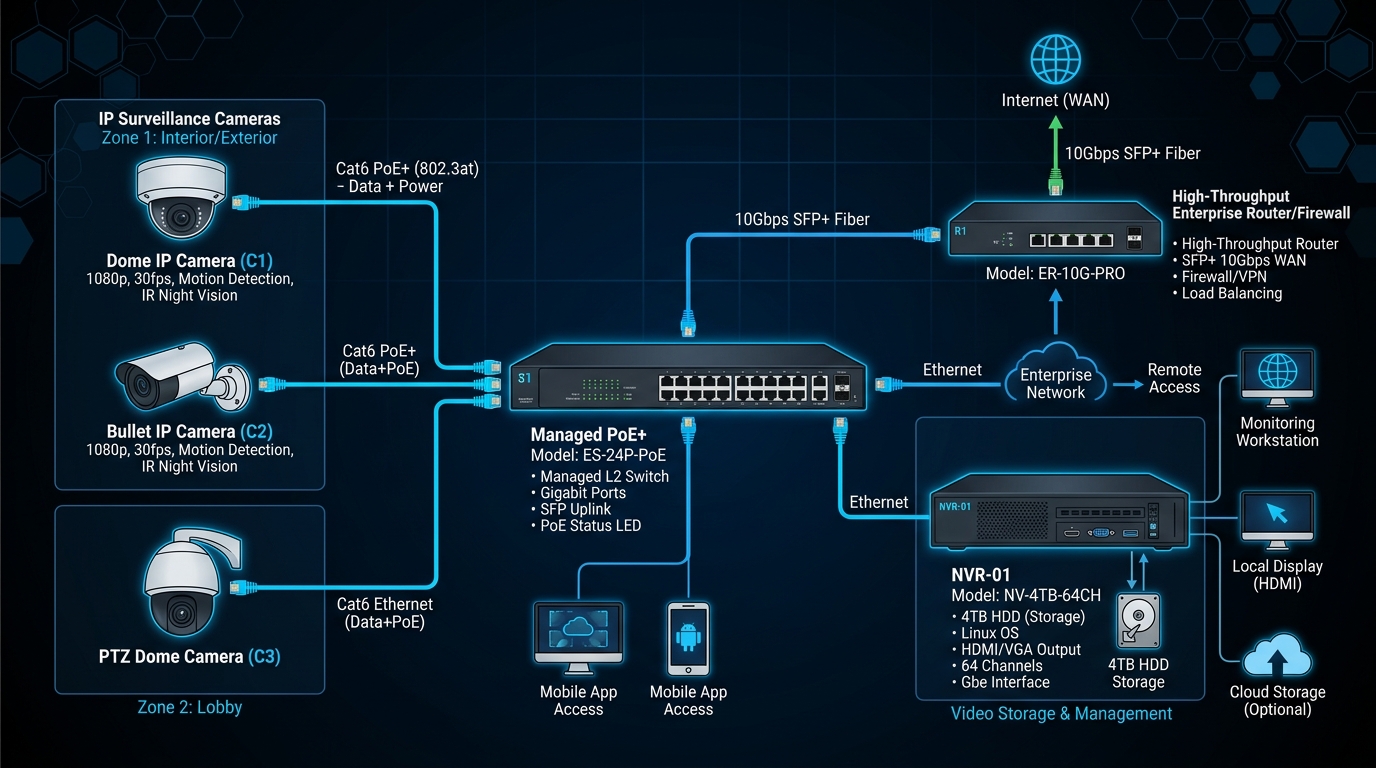
Physical security has converged into digital IP networking. The modern surveillance engineer must configure IP cameras, Network Video Recorders (NVR), and Power over Ethernet (PoE) switching fabrics with the same precision applied to enterprise servers.
Analog HD vs. IP Camera Architecture
Comparing legacy coaxial systems with modern Ethernet streaming:
- Analog HD (AHD / TVI / CVI): Requires separate RG59 coaxial video cables with BNC connectors alongside separate copper 12V DC power lines connected to a centralized Digital Video Recorder (DVR). Prone to high-frequency RF interference.
- Digital IP Cameras: Stream native digital video packets over standard Cat6 twisted pair cabling using Power over Ethernet (PoE 802.3af/802.3at). Delivers both 48V DC power and gigabit video telemetry across a single RJ45 connection up to 100 meters.
- Protocol Standards: Cross-vendor camera and NVR interoperability is mediated via ONVIF (Profile S/G/T) protocols and Real-Time Streaming Protocol (RTSP).
Remote Mobile Viewing & Cloud P2P Integration
Enabling real-time multi-channel monitoring on smartphones and central security workstations:
- Peer-to-Peer (P2P) Cloud Services: Scans QR code unique IDs to establish outbound TLS tunnels to secure relay clouds, completely bypassing the need for risky router port forwarding.
- Static Public IP & DDNS: Direct router port forwarding (e.g., ports 8000, 554, 80) configured with dynamic DNS (DDNS) when low-latency dedicated live viewing is required.
- VLAN Video Isolation: Placing all surveillance cameras into an isolated Surveillance VLAN (e.g., VLAN 50) to prevent video bandwidth saturation from impacting primary corporate data traffic.
CCTV Storage Calculation & Hard Drive Management
Enterprise surveillance demands continuous 24/7/365 video writes. Surveillance-grade hard drives (such as Western Digital Purple or Seagate SkyHawk) use specialized AllFrame firmware to eliminate dropped frames:
IT Support, Systems & Surveillance Career Skills Matrix
This multi-tier skills matrix maps core practical competencies directly to real-world operational job responsibilities:
| IT Engineering Domain | Core Technologies & Standards | Hands-On Practical Skillset | Target Enterprise Job Roles |
|---|---|---|---|
| Hardware & OS Computer Systems Engineering | UEFI/BIOS, TPM 2.0, PCIe Gen4/5 NVMe, DDR4/DDR5, GPT/MBR, Windows 10/11, Sysprep | Component assembly, power supply testing, thermal paste servicing, automated OS deployment, S.M.A.R.T. disk recovery | Desktop Support Technician, Hardware Service Engineer, Field Operations Specialist |
| Networking & AD Enterprise Systems Administration | TCP/IP, IPv4/IPv6, CIDR Subnetting, Active Directory (AD DS), DNS, DHCP Scopes, GPO, NTFS | Promoting Domain Controllers, structuring OUs, implementing Kerberos SSO, configuring DHCP failover, locking USB storage via GPO | Junior Systems Administrator, Network Support Specialist, Infrastructure Helpdesk Tier 2 |
| CCTV & Surveillance Physical & Digital Security Systems | IP Cameras, NVR/DVR, PoE (802.3af/at), RTSP, ONVIF, H.265 Codecs, P2P Cloud, WD Purple HDDs | Cat6 RJ45 termination, PoE switch power budget calculation, IP camera static addressing, mobile app P2P pairing, storage planning | Security Systems Integrator, CCTV Field Technician, Building Surveillance Engineer |
Recommended lab schematic visual reference placements for instructional technical documentation:
[Visual Placement 1 - PC Assembly Schematic]: Multi-angle diagram displaying ATX motherboard headers, PCIe x16 slots, dual-channel RAM configurations (slots 2 & 4), front-panel pins, and power delivery connectors.
[Visual Placement 2 - Active Directory Hierarchy]: Tree structure diagram showing Root Domain Controller, Organizational Unit (OU) divisions, Group Policy Inheritance, and workstation trust relationships.
[Visual Placement 3 - IP Surveillance PoE Network]: Topographical map of Cat6 PoE runs feeding exterior bullet cameras, interior 360-degree dome cameras, a 24-port PoE+ rack switch, NVR storage vault, and remote mobile viewing bridge.
Practical Troubleshooting FAQs: Real-World Solutions
- How do you resolve duplicate IP address conflicts in an enterprise DHCP scope?
Duplicate IP conflicts occur when a static IP address is assigned within the active dynamic leasing range of a DHCP server. To fix this: (1) Use arp -a or an IP scanner to pinpoint the conflicting MAC address. (2) Reconfigure the static device to use an address outside the DHCP distribution pool (e.g., reserving .1 to .50 for infrastructure). (3) Enable Conflict Detection Attempts (set to 2 or 3) on the Windows Server DHCP role so the server pings an IP before issuing it to a client.
- Why is an IP camera missing or displaying “No Video” on a PoE NVR switch?
Common root causes include: (1) Exceeded PoE Power Budget: Check if total wattage across connected cameras exceeds the switch power limit (e.g., PTZ cameras requiring 30W PoE+ 802.3at on a 15.4W standard 802.3af port). (2) Subnet Mismatch: Many factory-new IP cameras default to 192.168.1.64 or 192.168.0.120. If the NVR internal virtual NIC uses 172.16.254.x, the camera must be re-addressed using the vendor search utility. (3) Cat6 Cable Degradation: Test wire map continuity using an RJ45 cable tester to verify pins 1, 2, 3, and 6 are intact.
- What causes the client error: “An Active Directory Domain Controller could not be contacted”?
In 95% of cases, this is caused by DNS misconfiguration on the client workstation. Active Directory requires domain-joined clients to resolve _ldap._tcp.dc._msdcs.<domain> SRV records. If the client network adapter points to a public DNS server (like 8.8.8.8 or the office router) as its Primary DNS instead of the Domain Controller’s internal static IP address, domain join will fail immediately. Ensure the primary DNS points strictly to the Windows Server Domain Controller.
- How do you resolve “Windows Cannot Be Installed to This Disk. Selected Disk is of the GPT Partition Style”?
This error occurs when the installation USB was booted in legacy BIOS/CSM mode while attempting to install onto a modern GPT-partitioned drive. To resolve: (1) Enter UEFI firmware setup and disable CSM/Legacy Boot, enabling pure UEFI mode. (2) Alternatively, during Windows setup, press Shift + F10 to open Command Prompt, run diskpart > select disk 0 > clean > convert gpt, and restart installation under UEFI mode.
- What is the most effective bandwidth optimization technique for multi-camera CCTV networks?
Modern surveillance systems use dual-streaming: (1) Main Stream: High resolution (4K or 1080p, 25-30 FPS, H.265 codec) recorded directly to the local NVR storage array. (2) Sub Stream: Low resolution (D1 or 720p, 10-15 FPS, lower bitrate) transmitted over WAN and cellular networks for smooth, buffer-free multi-camera mobile viewing. Additionally, configuring Motion-Activated Recording instead of continuous 24/7 writing reduces storage consumption by up to 60%.