





Primary SEO Metadata
- Target SEO Title: WordPress Development in 2026: Complete Guide | Nemcon Lahore
- Meta Description: Master modern WordPress development in 2026. Learn custom themes, Gutenberg, WooCommerce, speed optimization & SEO at Nemcon Systems Lahore. Enroll now!
- Primary Keyword: WordPress Development
- Secondary & LSI Keywords: WordPress course, learn WordPress, WordPress web design, WordPress theme customization, custom plugin development, WooCommerce development, Elementor Pro, Gutenberg block editor, WordPress SEO optimization, website speed optimization, Core Web Vitals, WordPress security, responsive web design, WordPress migration, domain and hosting setup, Nemcon Systems Lahore, best WordPress institute.
- Search Intent: Comprehensive Educational Guide + Practical Industry Blueprint + Professional Certification Pathway.
WordPress Development in 2026: The Definitive Enterprise Guide to Web Design, WooCommerce & Full-Stack Mastery at Nemcon Systems
+----------------------------------------------------------------------------------------------------+
|                       ENTERPRISE WORDPRESS & WOOCOMMERCE ECOSYSTEM (2026)                          |
+------------------------------------+-----------------------------------+---------------------------+
| PRESENTATION & BLOCK UI            | BUSINESS LOGIC & CUSTOM CPTs      | INFRASTRUCTURE & SPEED    |
| - Full Site Editing (FSE) & Blocks | - Custom Post Types & ACF Pro     | - PHP 8.3 + OPcache & JIT |
| - Elementor Pro / Gutenberg Mix    | - WooCommerce High-Perf (HPOS)    | - Redis Object Caching    |
| - Mobile-First Fluid Breakpoints   | - REST API & WP GraphQL Endpoints | - Cloudflare Edge WAF/CDN |
+------------------------------------+-----------------------------------+---------------------------+
1. Introduction: Why WordPress Powers 43%+ of the Modern Web
In the fast-evolving arena of web engineering, digital technologies rise and fall with relentless speed. Yet, across more than two decades of technological disruption, WordPress has not merely survived—it has continuously expanded its global footprint. Today, WordPress powers over 43.5% of all websites globally and controls a staggering 62.8% market share within the Content Management System (CMS) industry. From small business landing pages in Lahore to high-traffic portals operated by Sony Music, TechCrunch, The White House, and Fortune 500 multinationals, WordPress remains the bedrock of digital publishing.
1.1 What Makes WordPress the Undisputed King of CMS?
The enduring dominance of WordPress stems from a rare confluence of architectural factors that proprietary website builders (such as Wix, Squarespace, or Shopify) cannot replicate:
- Complete Data Ownership & Open-Source Freedom: When developing on WordPress.org, organizations retain 100% sovereignty over their codebase, customer records, payment funnels, and relational databases. There are no vendor lock-ins, platform commission penalties, or sudden algorithmic shutdowns.
- Infinite Architectural Extensibility: With a repository exceeding 60,000 plugins and thousands of enterprise-grade themes, WordPress can mutate from a personal blog into a multi-vendor marketplace, a headless corporate portal, an e-learning academy, or a real estate listing network.
- Continuous Core Innovation: The transition into Full Site Editing (FSE), the modular Gutenberg block engine, Native WebP/AVIF generation, and High-Performance Order Storage (HPOS) in WooCommerce ensures that modern WordPress builds compete directly with bespoke React and Next.js applications in speed and agility.
- Unmatched Search Engine Visibility: Built natively with clean semantic markup, customizable permalinks, and granular taxonomy support, WordPress provides an unparalleled foundation for technical SEO.
1.2 WordPress.org (Self-Hosted) vs. WordPress.com: The Crucial Comparison
One of the most frequent misconceptions among beginners and non-technical business founders is confusing WordPress.org with WordPress.com. Navigating this distinction is fundamental to professional WordPress web design.
+--------------------------+-------------------------------------+-----------------------------------+
| Architectural Metric     | WordPress.org (Self-Hosted Master)  | WordPress.com (SaaS Hosting)      |
+--------------------------+-------------------------------------+-----------------------------------+
| Software Ownership       | 100% Open-Source GPL (You own all)  | Proprietary commercial platform   |
| Custom Plugin Freedom    | Unlimited (Install any plugin/code) | Restricted unless on top tiers    |
| Custom Theme Coding      | Complete PHP/CSS/JS child themes    | Limited template customization    |
| Database & Server Access | Full MySQL/MariaDB & SFTP/SSH access| No direct raw database editing    |
| Monetization & Ads       | 100% of revenue retained by owner   | Strict revenue sharing on ads     |
| E-Commerce Scalability   | Unlimited WooCommerce + HPOS custom | Expensive mandatory e-commerce plan|
| Technical Maintenance    | Managed by developer / administrator| Automated by WordPress.com cloud  |
| Ideal Use Case           | Professional agencies & enterprises | Simple personal hobby blogs       |
+--------------------------+-------------------------------------+-----------------------------------+
For any serious enterprise, digital startup, or professional developer trained at Nemcon Systems, self-hosted WordPress.org is the non-negotiable industry standard.
1.3 Why Global Brands Choose WordPress for Scalable Growth in 2026
Modern enterprise requirements demand agility without sacrificed stability. Traditional custom web stacks built entirely from scratch in Laravel or Django often require months of full-stack engineering and cost tens of thousands of dollars to build and maintain. In contrast, an architecturally sound WordPress deployment provides:
- Instant Marketing Independence: Non-technical marketing and content teams can publish landing pages, edit copy, update pricing tables, and run A/B conversion tests within minutes using visual block workflows without opening tickets with software engineers.
- API-First Decoupled Agility: Modern WordPress functions seamlessly as a Headless CMS. By querying core data via the WordPress REST API or WPGraphQL, developers can power mobile apps, IoT devices, or modern Astro and Next.js frontends while letting editorial staff work in the familiar WordPress dashboard.
- Cost-Efficient Scalability: Instead of recurring monthly seat licenses that scale aggressively with traffic, self-hosted WordPress runs on high-speed cloud infrastructure at a fraction of enterprise SaaS costs.
2. Setting Up the Foundation: Domain, Hosting & Installation
A high-performance WordPress website is only as strong as the infrastructure beneath it. Poor hosting configurations are responsible for over 80% of slow page loads, security compromises, and database connection errors (Error Establishing a Database Connection).
2.1 Selecting the Best Hosting Architecture
Choosing the right hosting environment requires matching resource requirements with business scale:
+--------------------------+--------------------+---------------------+-----------------------------+
| Hosting Category         | Performance Tier   | Monthly Cost (USD)  | Target Deployment           |
+--------------------------+--------------------+---------------------+-----------------------------+
| Shared Hosting           | Low to Moderate    | $3 - $10 / month    | Local testing, test sites   |
| Cloud VPS (DigitalOcean) | High & Dedicated   | $12 - $48 / month   | Fast agencies, client sites |
| Managed WordPress Cloud  | Extreme Enterprise | $30 - $250+ / month | Mission-critical WooCommerce|
+--------------------------+--------------------+---------------------+-----------------------------+
- Shared Hosting: Multiple websites share a single physical CPU and memory pool. A traffic spike on a neighboring tenant can drag down your site’s response times. Acceptable only for basic proof-of-concept projects.
- Cloud Virtual Private Servers (VPS): Deploying instances on DigitalOcean, Linode, or Vultr using server management panels (such as RunCloud, Cloudways, or CyberPanel) guarantees dedicated RAM, NVMe SSD storage, and isolated vCPU resources.
- Managed WordPress Hosting: Platforms like Kinsta, WP Engine, and Rocket.net deliver automated server-level caching, isolated PHP workers, automated staging-to-production synchronizations, and daily off-site disaster backups.
2.2 Essential Modern Server Prerequisites for 2026
To run modern WordPress smoothly, ensure your hosting stack adheres strictly to these enterprise benchmarks:
- PHP Version: PHP 8.2 or PHP 8.3 with OPcache and JIT compiler enabled (delivers up to a 300% throughput increase compared to legacy PHP 7.4).
- Database Engine: MySQL 8.0+ or MariaDB 10.6+ with
InnoDBstorage engine configured. - Web Server: NGINX (or LiteSpeed Enterprise with LSCache) acting as a high-concurrency reverse proxy handling static file offloading.
- Memory Allocation: Minimum
memory_limit = 256M(512M recommended for WooCommerce operations). - Encryption & Transport: Automated Let’s Encrypt Wildcard SSL with HTTP/2 or HTTP/3 (QUIC) protocol support enabled.
- Object Cache: In-memory Redis or Memcached datastore to cache SQL query results and eliminate repetitive database read operations.
2.3 Step-by-Step WordPress Installation & Core Configuration
While many hosts provide “One-Click Installers”, professional engineers configure production environments manually or via WP-CLI (WordPress Command Line Interface) to maintain maximum security and clean architecture:
Step 1: Database Provisioning
Create a dedicated MariaDB database with a unique user and restricted privileges:
CREATE DATABASE nemcon_wpdb CHARACTER SET utf8mb4 COLLATE utf8mb4_unicode_520_ci;
CREATE USER 'nemcon_dbuser'@'localhost' IDENTIFIED BY 'StrongEnterprisePassword2026!#';
GRANT ALL PRIVILEGES ON nemcon_wpdb.* TO 'nemcon_dbuser'@'localhost';
FLUSH PRIVILEGES;
Step 2: Hardening wp-config.php
Edit your configuration file before initializing the installation script. Replace default database prefixes and define essential security keys:
// Change default table prefix from 'wp_' to prevent SQL injection target discovery
$table_prefix = 'nc79_';

// Disable inline file editing from the WordPress admin dashboard
define( 'DISALLOW_FILE_EDIT', true );

// Force administrative SSL encryption
define( 'FORCE_SSL_ADMIN', true );

// Limit post revisions to prevent database bloat
define( 'WP_POST_REVISIONS', 5 );

// Set autosave interval to 180 seconds
define( 'AUTOSAVE_INTERVAL', 180 );

// Define debugging parameters (Never display errors on live production)
define( 'WP_DEBUG', false );
define( 'WP_DEBUG_LOG', true );
define( 'WP_DEBUG_DISPLAY', false );
Step 3: Critical Dashboard Configuration
Immediately upon logging into the newly installed dashboard:
- Permalinks (
Settings > Permalinks): Switch immediately from “Plain” (?p=123) to “Post name” (/%postname%/). This is non-negotiable for Google crawling and technical SEO. - Search Engine Visibility (
Settings > Reading): Confirm that “Discourage search engines from indexing this site” is unchecked once ready for launch. - Timezone & Locale (
Settings > General): Set correct regional timezones (e.g.,Asia/Karachifor Pakistan projects) to prevent scheduling errors for blog posts and sale campaigns. - Purge Default Content: Delete sample pages, the “Hello World” post, and default comment placeholders to remove duplicate placeholder footprints.
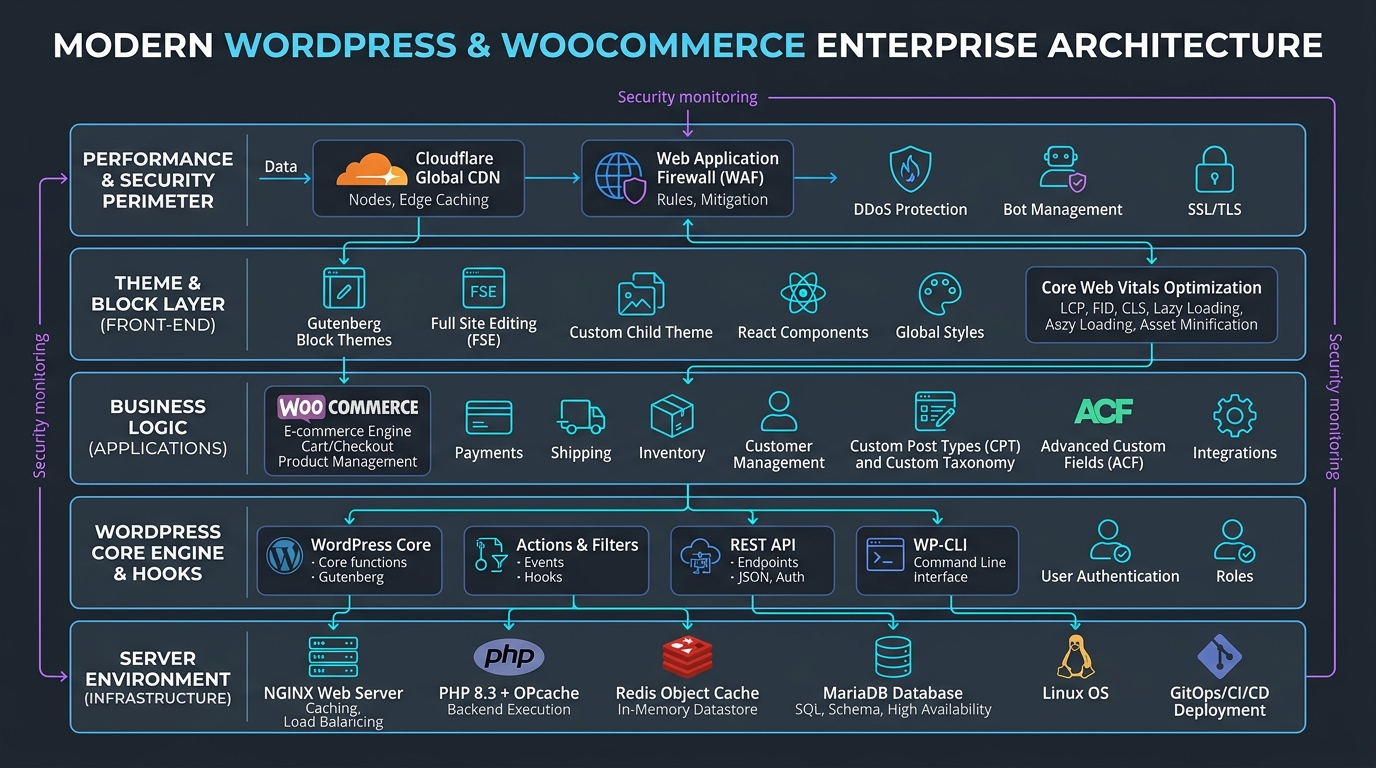 Figure 1.0: Modern WordPress & WooCommerce Enterprise Architecture Blueprint — Server Environment, Core Hooks Engine, Theme Layer, Business Logic, and CDN Perimeter (Nemcon Systems Lahore).
3. Theme Selection & Visual Page Building Mastery
In modern web design, your choice of theme and builder architecture dictates the speed, code quality, and conversion capabilities of your website.
3.1 Modern Gutenberg (FSE) vs. Visual Page Builders (Elementor Pro / Divi)
The WordPress visual ecosystem in 2026 is divided into two primary design paradigms:
+--------------------------+-------------------------------------+-----------------------------------+
| Evaluation Metric        | Gutenberg / Block Themes (FSE)      | Elementor Pro / Visual Builders   |
+--------------------------+-------------------------------------+-----------------------------------+
| Page Speed & DOM Depth   | Extremely Lean (Minimal DOM nesting)| Moderate (Nested `<div>` wrappers)|
| Learning Curve           | Moderate (Block-based logic)        | Beginner-friendly drag-and-drop   |
| Asset Footprint          | Pure zero-bloat CSS/JS on demand    | Extra framework CSS & JS bundles  |
| Design Flexibility       | Rapidly maturing full-site editing  | Pixel-perfect absolute control    |
| Client Usability         | Native, crash-proof content editing | High flexibility, risk of breaking|
| Best For                 | Speed-first blogs, corporate portals| High-converting marketing funnels |
+--------------------------+-------------------------------------+-----------------------------------+
- Gutenberg & Full Site Editing (FSE): Built directly into the WordPress core with React, Gutenberg produces clean, semantic HTML5. In 2026, pairing block frameworks (such as Spectra, GenerateBlocks, or Kadence Blocks) with lightweight themes delivers near-perfect 100/100 Core Web Vitals scores out of the box.
- Elementor Pro: Remains the world’s most popular visual builder for agency workflows. It empowers designers to construct intricate motion effects, dynamic post templates, custom WooCommerce product archives, and conversion popups without writing low-level code. However, utilizing Elementor Pro professionally requires strict asset optimization and container discipline to eliminate structural bloat.
3.2 Clean Code vs. Bloated Builders: Choosing High-Performance Themes
Never choose bloated, legacy multi-purpose marketplace themes packed with 50 unused bundled plugins, visual composers, and megabytes of unminified scripts. Professional developers select ultra-lean, modular foundation themes:
- Astra (Brainstorm Force): Under 50KB in default asset size, vanilla JavaScript execution (zero jQuery dependencies), schema-ready, and deeply integrated with both Gutenberg and Elementor Pro.
- GeneratePress (Tom Usborne): Revered by technical SEO specialists and performance purists. Boasts ultra-clean modular architecture and an intuitive hook system that allows developers to inject custom PHP or block templates anywhere on the page without modifying core template files.
- Hello Elementor: A minimalist, blank canvas theme engineered specifically to offload all styling to the Elementor Pro theme builder engine, eliminating stylesheet conflicts.
3.3 Responsive UI/UX Principles for Multi-Device Dominance
Over 72% of web traffic in Pakistan and emerging markets originates from mobile smartphones. A desktop-first design mindset is a recipe for high bounce rates. Elite developers employ responsive best practices:
- Fluid Typography & Spacing: Avoid rigid pixel values for titles. Use modern CSS mathematical functions:
/* Fluid scaling from 1.75rem (mobile) up to 3rem (desktop) */ .hero-heading { font-size: clamp(1.75rem, 4vw + 1rem, 3rem); line-height: 1.15; } - Touch-Friendly Tap Targets: Ensure interactive elements (buttons, mobile menu triggers, cart links) have a minimum clickable area of 48px by 48px with at least 8px of clearance between clickable items.
- Container Flexbox vs. Legacy Inner Sections: In modern Elementor and Gutenberg, legacy tables and nested section grids have been superseded by CSS Flexbox and CSS Grid containers, reducing HTML DOM tree depth by up to 60%.
4. Customizing Functionality: Plugins & Architecture
Plugins extend WordPress into a tailored software solution. However, indiscriminate plugin installations (“plugin overload”) introduce severe security vulnerabilities, memory exhaustion, and database slowdowns.
4.1 Essential Production Plugin Stack Checklist
Every enterprise WordPress build engineered at Nemcon Systems adheres to a vetted, minimal plugin matrix:
+--------------------------+----------------------------+---------------------------------------------+
| System Layer             | Recommended Enterprise Tool| Primary Production Benefit                  |
+--------------------------+----------------------------+---------------------------------------------+
| Technical SEO            | Rank Math Pro / Yoast SEO  | XML sitemaps, OpenGraph, JSON-LD Schema     |
| Performance Caching      | WP Rocket / LiteSpeed Cache| Page caching, Gzip/Brotli, CSS/JS delay     |
| Security Hardening       | Wordfence / Solid Security | Firewall rules, 2FA, brute-force mitigation |
| Contact & Lead Forms     | Fluent Forms / Gravity     | Drag-and-drop forms with Webhook/CRM sync   |
| Database Optimization    | WP-Optimize                | Revision purging, InnoDB table defragment   |
| Image Compression        | ShortPixel / Converter for | Automated WebP generation & EXIF stripping  |
+--------------------------+----------------------------+---------------------------------------------+
4.2 Custom Post Types (CPTs) & Advanced Custom Fields (ACF Pro)
Standard WordPress provides only two native content types: Posts (chronological) and Pages (hierarchical). Enterprise websites require bespoke data models—such as Courses, Portfolios, Properties, or Case Studies.
Instead of installing heavy single-purpose plugins, full-stack developers declare native Custom Post Types and pair them with Advanced Custom Fields (ACF Pro):
Registering a Custom Post Type via functions.php:
function nemcon_register_courses_cpt() {
    $labels = array(
        'name'               => _x( 'Courses', 'post type general name', 'nemcon' ),
        'singular_name'      => _x( 'Course', 'post type singular name', 'nemcon' ),
        'menu_name'          => _x( 'Courses', 'admin menu', 'nemcon' ),
        'add_new'            => _x( 'Add New', 'course', 'nemcon' ),
        'add_new_item'       => __( 'Add New IT Course', 'nemcon' ),
        'edit_item'          => __( 'Edit Course', 'nemcon' ),
        'all_items'          => __( 'All Courses', 'nemcon' ),
        'search_items'       => __( 'Search Courses', 'nemcon' ),
        'not_found'          => __( 'No courses found', 'nemcon' ),
    );

    $args = array(
        'labels'             => $labels,
        'public'             => true,
        'publicly_queryable' => true,
        'show_ui'            => true,
        'show_in_menu'       => true,
        'query_var'          => true,
        'rewrite'            => array( 'slug' => 'courses' ),
        'capability_type'    => 'post',
        'has_archive'        => true,
        'hierarchical'       => false,
        'menu_position'      => 5,
        'menu_icon'          => 'dashicons-welcome-learn-more',
        'supports'           => array( 'title', 'editor', 'thumbnail', 'excerpt', 'custom-fields' ),
        'show_in_rest'       => true, // Enables Gutenberg block editor & REST API access
    );

    register_post_type( 'courses', $args );
}
add_action( 'init', 'nemcon_register_courses_cpt' );
4.3 Developing Custom Child Themes to Protect Modifications
Never add custom PHP functions or custom CSS directly to a parent theme. When the theme developer releases a security update, all direct modifications are permanently overwritten. Always initialize a Child Theme:
style.css (Child Theme Header):
/*
 Theme Name:   Astra Child - Nemcon Systems
 Theme URI:    https://nemconsystems.com
 Description:  Customized high-performance child theme for Nemcon Systems web platform.
 Author:       Nemcon Systems Engineering Faculty
 Author URI:   https://nemconsystems.com
 Template:     astra
 Version:      1.0.0
 Text Domain:  astra-child
*/
functions.php (Proper Enqueueing):
<?php
// Prevent direct file access
if ( ! defined( 'ABSPATH' ) ) {
    exit;
}

// Enqueue Parent and Child Stylesheets cleanly
function nemcon_child_theme_scripts() {
    wp_enqueue_style( 'parent-style', get_template_directory_uri() . '/style.css' );
    wp_enqueue_style( 'child-style', get_stylesheet_uri(), array( 'parent-style' ), wp_get_theme()->get('Version') );

    // Enqueue custom modular JavaScript
    wp_enqueue_script( 'nemcon-main', get_stylesheet_directory_uri() . '/assets/js/custom-app.js', array('jquery'), '1.0.0', true );
}
add_action( 'wp_enqueue_scripts', 'nemcon_child_theme_scripts' );
5. E-Commerce Excellence with WooCommerce
E-commerce is the financial engine of the internet. With over 30% of all top 1 million e-commerce websites powered by WooCommerce, mastering this platform is one of the highest-paying skill sets in digital engineering.
5.1 Architecture: High-Performance Order Storage (HPOS)
Historically, WooCommerce stored orders inside the standard wp_posts and wp_postmeta tables. On stores with tens of thousands of orders, querying post metadata created massive SQL bottlenecks.
In 2026, High-Performance Order Storage (HPOS) is the default standard. HPOS migrates e-commerce data into dedicated, indexed relational tables (wp_wc_orders, wp_wc_order_addresses, wp_wc_order_operational_data), accelerating checkout processing and order lookups by up to 400%.
5.2 Payment Gateway Integrations & Localized Checkout (Pakistan & Global)
Global e-commerce requires multi-currency, multi-gateway versatility. A premier WordPress course in Lahore must prepare developers to integrate both international and local payment rails:
+--------------------------+----------------------------+---------------------------------------------+
| Gateway Category         | Supported Services         | Technical Integration Method                |
+--------------------------+----------------------------+---------------------------------------------+
| Global Credit/Debit Cards| Stripe, PayPal, Square     | Official REST APIs, Webhook event handlers  |
| Pakistan Local Gateways  | JazzCash, EasyPaisa, 1Link | Merchant APIs, IPN (Instant Payment Notif)  |
| Bank Direct & Cards (PK) | PayFast, Bank Alfalah, HBL | Hosted Checkout & Direct API Merchant Token |
| Buy Now Pay Later (BNPL) | QisstPay, Tabby, Klarna    | Installment payment scheduling plugins      |
| Cash on Delivery (COD)   | Native WooCommerce + OTP   | SMS verification via Twilio / local SMS API |
+--------------------------+----------------------------+---------------------------------------------+
5.3 Checkout Friction Reduction & Cart Abandonment Mitigation
The average e-commerce cart abandonment rate exceeds 69.8%. Eliminating checkout friction directly compounds revenue:
- One-Page & Slide-Out Cart Checkout: Eliminate multi-step cart pages. Deploy AJAX side-cart drawers and single-page checkout templates using plugins like FunnelKit (AeroCheckout) or WooCommerce Blocks.
- Guest Checkout Enforced: Never force first-time shoppers to verify accounts via email before purchasing. Allow seamless guest checkout, automatically generating account credentials in the background upon payment success.
- Automated Abandoned Cart Sequences: Deploy webhooks to sync pending checkouts with marketing automation platforms (Klaviyo, Brevo, or FluentCRM) to dispatch automated recovery incentives 1 hour and 24 hours post-abandonment.
6. On-Page SEO, Speed Optimization & Core Web Vitals
A beautifully designed website that fails to rank on Google or takes 5 seconds to load on mobile is an operational liability. Technical SEO and speed optimization are intrinsic components of modern WordPress development.
6.1 Complete On-Page SEO Strategy (Rank Math / Yoast SEO)
- Strategic Hierarchy: Maintain a strict heading structure (one single
<h1>containing primary keyword intent, followed sequentially by<h2>,<h3>, and<h4>). - Schema.org Structured Data: Inject rich semantic JSON-LD graphs directly into the
<head>:OrganizationSchema: Establishes brand credibility, official logos, and social channels.Course/ServiceSchema: Highlights curriculum modules, tuition pricing, and institutional credentials.FAQPageSchema: Qualifies your pages for high-CTR Google “People Also Ask” rich snippets.
- Automated XML Sitemaps: Ensure your SEO plugin automatically generates clean, paginated XML sitemaps (
/sitemap_index.xml) that exclude system endpoints, tag archives, and utility redirects.
6.2 Image Optimization & Modern Media Delivery
Images typically account for 60% to 80% of total page byte weight. Unoptimized images destroy mobile Core Web Vitals.
- Next-Gen WebP and AVIF Formats: Convert standard JPEGs and PNGs to WebP or AVIF formats, achieving an immediate 30% to 50% byte-size reduction with zero loss in visual clarity.
- Native Lazy Loading: Modern browsers support native image deferral:
<img src="wordpress-banner.webp" alt="WordPress Development Course Lahore" loading="lazy" width="1200" height="675" /> - Explicit Width and Height Attributes: Always declare explicit
widthandheightdimensions on<img>tags to allocate space before rendering, completely preventing Cumulative Layout Shifts (CLS).
6.3 Conquering Core Web Vitals (Scoring 90+ on Google PageSpeed Insights)
Google’s ranking algorithms evaluate user experience through three strict Core Web Vitals metrics:
+--------------------------+------------------------+-------------------------------------------------+
| Core Web Vitals Metric   | Google Target Score    | Primary Optimization Method                     |
+--------------------------+------------------------+-------------------------------------------------+
| LCP (Largest Contentful) | < 2.5 Seconds (Fast)   | Server OPcache, Redis, Critical CSS, WebP Hero  |
| INP (Interaction to Next)| < 200 Milliseconds     | Delaying unneeded JS execution, eliminating DOM |
| CLS (Cumulative Shift)   | < 0.1 Score (Zero lag) | Preloading fonts, explicit image dimensions     |
+--------------------------+------------------------+-------------------------------------------------+
Advanced Caching & Asset Optimization Rules:
- Redis Object Caching: Cache database queries in memory to prevent repetitive SQL calls on high-traffic pages.
- Delaying JavaScript Execution: Tools like WP Rocket or FlyingPress hold back secondary analytical scripts (Google Tag Manager, Facebook Pixel, live chat widgets) until user interaction (mouse move, scroll, touch), allowing the main thread to render the UI instantly.
- Cloudflare Edge Cache (APO): Deploy Cloudflare Automatic Platform Optimization (APO) to cache entire HTML pages across 300+ global edge data centers, delivering TTFB (Time to First Byte) speeds under 80ms worldwide.
7. Enterprise WordPress Security & Maintenance
Because of its massive global market share, WordPress is the primary target for automated malware scanners, credential stuffers, and botnet intrusions. Security is not an afterthought—it must be baked into every layer of development.
+----------------------------------------------------------------------------------------------------+
|                         ENTERPRISE WORDPRESS SECURITY HARDENING LAYERS                             |
+------------------------------------+-----------------------------------+---------------------------+
| IDENTITY & ACCESS PERIMETER        | NETWORK FIREWALL & FILE PERMISSION| RUNTIME & BACKUP DEFENSE  |
| - Mandatory Two-Factor Auth (2FA)  | - Cloudflare Edge WAF & Bot Rule  | - Daily Immutable S3 Snap |
| - Custom Obfuscated Admin Login URI| - File Permissions: 644/755 Strict| - Automated Malware Scans |
| - Max 3 Failed Login Lockouts      | - XML-RPC Disabled via NGINX      | - Staging-to-Prod Git Flow|
+------------------------------------+-----------------------------------+---------------------------+
7.1 Production Hardening Checklist
- Mandatory Two-Factor Authentication (2FA): Enforce time-based one-time password (TOTP) authentication via Google Authenticator or Microsoft Authenticator for all Administrator and Editor roles.
- Obfuscate Administrative Endpoints: Change the default
/wp-adminand/wp-login.phpURLs to custom pathways (e.g.,/nemcon-portal/) using security modules to instantly neutralize 99% of automated brute-force bots. - Completely Disable XML-RPC: The legacy
xmlrpc.phpprotocol is heavily abused for DDoS amplification and brute-force amplification attacks. Disable it in your.htaccessor NGINX configuration:# Block WordPress xmlrpc.php requests <Files xmlrpc.php> Order Deny,Allow Deny from all </Files> - Enforce Strict File Permissions:
- Directories:
755(Read, Write, Execute for Owner; Read and Execute for others). - Files:
644(Read and Write for Owner; Read-only for others). wp-config.php:600or440(Restricted entirely from public read access).
- Directories:
7.2 Automated Backup Routines & Staging Workflows
A site without automated, off-site disaster recovery is a ticking time bomb.
- The 3-2-1 Backup Rule: Maintain 3 copies of your data, across 2 distinct media types, with at least 1 copy stored entirely off-site (such as Amazon S3, Wasabi, or Google Cloud Storage). Tools like UpdraftPlus Premium or Duplicator Pro automate daily database snapshots and weekly full-filesystem archives.
- Staging-to-Production Deployments: Never test plugin updates, PHP version upgrades, or theme code changes on a live production site. Always duplicate the site to a secure staging environment, test functionality thoroughly, and deploy to production only after quality assurance.
8. Career Roadmap & Hands-On Training at Nemcon Systems
The demand for talented, technically rigorous WordPress engineers has never been higher. Yet, the marketplace is flooded with amateur “tutorial followers” who can install a template but freeze the moment a PHP syntax error occurs, a database crashes, or a client demands custom API integration.
8.1 The Booming Market for Professional WordPress Developers
Mastering full-stack WordPress development opens high-income career avenues across global and local markets:
- High-Ticket Freelancing (Upwork & Fiverr): Global clients routinely pay $1,500 to $7,500+ for custom WooCommerce store builds, speed optimization overhauls, and bespoke business websites.
- Agency Web Designer & Full-Stack Engineer: Tech agencies across Pakistan, the Middle East, the UK, and North America actively recruit WordPress developers who understand PHP, responsive CSS, and Core Web Vitals.
- Monthly Maintenance Retainers: Building a client roster of 20 businesses paying $150 to $300/month for hosting management, daily security scans, and software updates creates recurring, predictable agency revenue.
8.2 Why Self-Learning Hits Roadblocks vs. Practical Mentorship
Countless aspiring developers spend months trapped in “tutorial hell”—watching fragmented YouTube videos that teach outdated practices (like modifying core files or building with bloated legacy builders) without explaining why things work under the hood.
When unexpected errors arise—such as white-screen-of-death (WSOD), broken payment webhooks, or fatal plugin conflicts—self-learners often lack the debugging tools and architectural foundation needed to resolve them.
8.3 Why Nemcon Systems in Lahore is the Top-Tier Destination for WordPress Mastery
Located in Umar Block, Allama Iqbal Town, Lahore, Nemcon Systems has established itself as the premier IT training institute for practical, industry-standard web engineering.
+----------------------------------------------------------------------------------------------------+
|                         THE NEMCON SYSTEMS ADVANTAGE (WHY WE STAND OUT)                            |
+------------------------------------+-----------------------------------+---------------------------+
| 100% HANDS-ON LAB SESSIONS         | LIVE COMMERCIAL CLIENT PROJECTS   | SENIOR INDUSTRY MENTORSHIP|
| - Dedicated computer lab racks     | - Build real WooCommerce stores   | - Learn from senior system|
| - Code custom child themes from day| - Deploy to live cloud hosting    |   architects & developers |
| - Master Git, WP-CLI, and terminal | - Optimize live Core Web Vitals   | - 1-on-1 portfolio review |
+------------------------------------+-----------------------------------+---------------------------+
Our comprehensive WordPress Development & E-Commerce Course takes you from initial server setup and domain provisioning to advanced PHP theme customizations, WooCommerce checkout engineering, and enterprise security hardening. Trainees graduate not with theoretical certificates, but with a battle-tested live portfolio of production-ready websites.
9. Frequently Asked Questions (FAQ Section - Schema Ready)
Is WordPress good for beginners with zero coding experience?
Yes. One of the greatest strengths of WordPress is its gentle learning curve. Beginners can quickly start creating beautiful, responsive pages using modern visual block editors and intuitive themes like Astra and Elementor without writing a single line of code. However, aspiring professionals who want to offer high-paying client services should learn foundational HTML, CSS, JavaScript, and basic PHP—all of which are comprehensively taught in the hands-on curriculum at Nemcon Systems Lahore.
How much does it cost to build a professional WordPress website in 2026?
The baseline cost for a self-hosted WordPress website typically ranges between $60 and $200 per year for fundamental infrastructure (a custom .com domain at ~$12/year and reliable cloud hosting at ~$5 to $15/month). Professional agency projects incorporating custom child theme development, premium plugins (Elementor Pro, ACF Pro), WooCommerce payment gateways, and technical SEO typically range from $800 to $5,000+ depending on project complexity.
Can WooCommerce handle enterprise-level stores with thousands of products?
Absolutely. When configured on high-performance infrastructure with High-Performance Order Storage (HPOS), Redis object caching, and a content delivery network (CDN) like Cloudflare, WooCommerce comfortably scales to hundreds of thousands of products and millions of monthly pageviews. Enterprise brands such as Singer, All Blacks, and AeroPress run their high-volume online businesses on WooCommerce.
How can I join the hands-on WordPress development training at Nemcon Systems?
Prospective students can enroll directly by visiting our campus at Umar Block, Allama Iqbal Town, Lahore, calling our academic advisory desk at +92 321 4633555, or registering online through the official portal at nemconsystems.com. Weekend and evening batches are available with dedicated lab access and live project mentorship.
10. Conclusion & Take the Next Step
WordPress in 2026 is no longer just a humble blogging platform—it is a sophisticated, versatile, and high-performance enterprise application framework. The convergence of Full Site Editing (FSE), WooCommerce HPOS, Headless API architecture, and AI-assisted workflows ensures that WordPress will continue dominating the global web for the next decade.
The opportunity to build high-income careers, launch scalable e-commerce brands, and deliver high-ticket digital solutions has never been greater.
Take Action Today:
Are you ready to stop watching tutorials and start building professional, high-speed, enterprise-grade websites that stand out in the global marketplace?
- Explore the Course: Review our complete WordPress Web Design & Development Syllabus.
- Campus Location: Umar Block, Allama Iqbal Town, Lahore, Pakistan.
- Direct Helpline & WhatsApp: +92 321 4633555
- Official Website: https://nemconsystems.com
{/* JSON-LD Schema.org Structured Data */}